An application for the iPhone or iPod touch for study of Kanji in Context, iKIC is now available for sale at the App Store! Using your iPhone or iPod touch, you can work on mastering kanji anytime, anywhere.
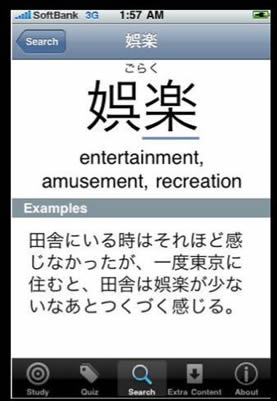
- The iKIC software is designed to help users acquire mastery of 1,947 everyday-use kanji (all of the 1,945 characters designated as essential by the Japanese Ministry of Education plus two more characters) and approximately 10,000 vocabulary words that employ those kanji. Ability to read a newspaper is an important indicator of literacy in any language, and as Japanese newspapers are composed almost entirely of vocabulary based on everyday-use kanji, iKIC is a powerful aid to achievement of literacy in Japanese.
- Essentially iKIC is the same as SKIP, the computer-based software for teaching kanji that is used at the IUC. All of the contents of the reference book and the workbook for Kanji in Context (both published by The Japan Times) are included in iKIC. In addition, the iKIC application features audio recordings of the correct pronunciation of vocabulary words and sample sentences, written glosses of the Japanese pronunciations and English definitions, and illustrations of the proper stroke order for writing each kanji.
- The 1,947 characters in iKIC are presented in 143 lessons. Users learn the kanji introduced in each lesson unit and the vocabulary words that incorporate those kanji. To facilitate study, each vocabulary item is presented in two forms, a basic dictionary form and an applied form.
- In each lesson (unit), the student can use iKIC flashcards to review. Three kinds of flashcards are available, one showing the reading of a kanji, another the meaning, and the third the kanji itself. By double-tapping a card, the student can access an audio recording and review the correct pronunciation of the item.
- In each lesson (unit), the top screen is a list of the vocabulary items presented in that lesson. By shaking the iPhone or iPod touch, a user can activate the iPhone interface and cause iKIC to display the readings and the English definitions of all items on the screen.
- Audio has been added to all the items in Japanese in iKIC. This makes it possible for users to learn the correct pronunciation as they learn a vocabulary item.
- An index function makes it possible to use the iKIC application as a dictionary.